 Tiraz
Arabic Fonts on iPhone: What Actually Works
Search for “Arabic fonts for iPhone” and you'll find three different things under one name: decorated text you copy and paste, font files you install in the system, and design apps with fonts built in. This article explains the difference honestly, when each one helps, and where to find calligraphic Arabic fonts for your designs on iPhone.
First: copy-paste “fonts” aren't fonts
“Fancy font” sites and apps don't change the font; they swap your letters for other Unicode symbols. English has full sets of decorated mathematical letters, so the result looks like a new font. Arabic has no alternative alphabet, so the “decoration” is usually tatweel (ـ), vowel marks and symbols around the word.
That works for an account name or a bio, but it stays in the device's own font, so it will never give you Thuluth or Diwani. For decorating names both ways, read the article on name decoration apps.
Second: installing a font on iPhone
iOS lets you add fonts through App Store apps that provide them; once installed they appear in Settings → General → Fonts. But note the limits:
- An installed font doesn't change the system font and won't appear in WhatsApp or Messages.
- It shows up only in apps that support custom fonts, such as Pages, Keynote, and some design apps.
- You have to find the Arabic font file yourself and check its license, as in the free Arabic fonts article.
- Some apps don't join Arabic letters properly even with a correct font.
Third: a design app with fonts built in
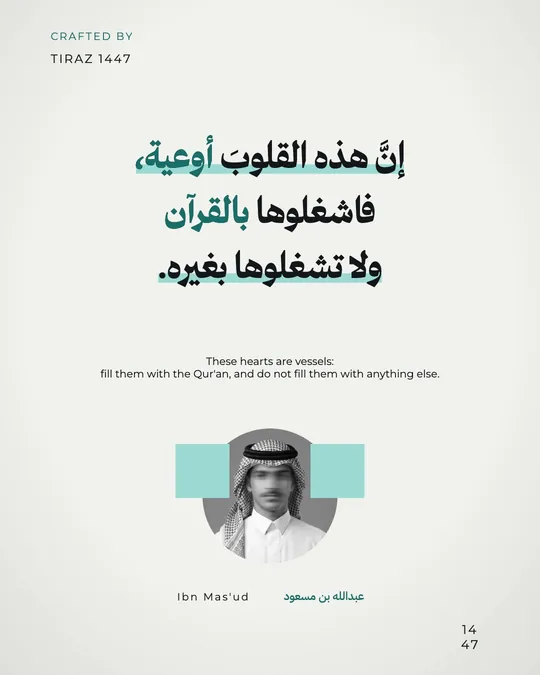
The easiest route if you want a design rather than a system font: a design app with Arabic fonts ready and tested. Tiraz is built on this: more than 230 Arabic and Latin font families that download inside the app the first time you use them, with no installing, files, or setup. Arabic joins and runs right to left, and every Arabic font has a kashida table tested on every letter.
Browse fonts by script: Thuluth, Diwani, Nastaliq, Ruqaa, Kufic and modern; each font page shows its letters and weights.
Which font for which design?
- Daily stories and Instagram: a clear modern font such as Cairo, Tajawal, or Almarai.
- Wedding invitations: Diwani for names, Thuluth for the headline.
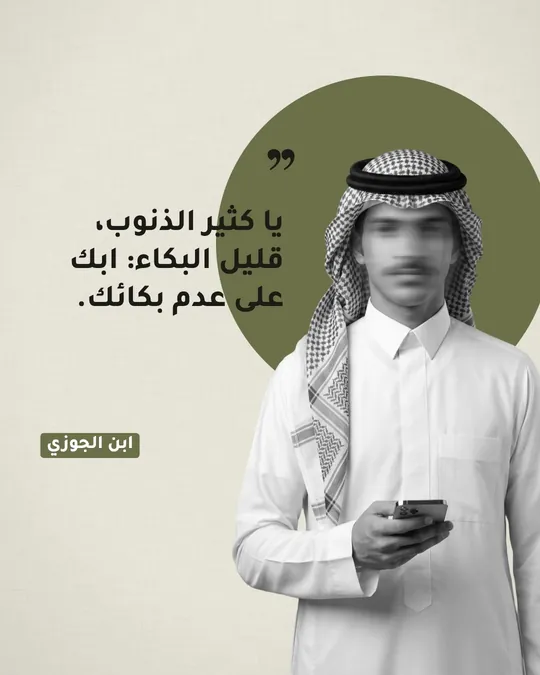
- Quotes and poetry: Nastaliq or Ruqaa.
- Verses and dhikr: a vowelled Naskh such as Amiri or the Quran fonts.
- Logos: Kufic or a bold display face.
To learn each script and its history, read the article on the types of Arabic calligraphy.
The iPhone's own Arabic fonts
iOS ships with system Arabic fonts such as SF Arabic and Geeza Pro: clear reading fonts designed for interfaces, not calligraphy. Your phone uses them for messages and menus, but they won't give you Diwani or Thuluth for an invitation or a panel.
Arabic fonts for stories and Instagram
- The fonts inside Instagram and Snapchat are limited, so design the text in Tiraz and export a story-size image.
- With Gold, copy the text as a transparent sticker and paste it straight onto your story photo.
- Save one design in your favorite font and duplicate it each time with new text, keeping a consistent look.
Writing beautiful Arabic on a photo from your iPhone
Start a new design
Download Tiraz from the App Store, tap the gold + at the bottom, and choose Blank and a size, or From Photo to start with your picture. Ready sizes include post, story, square, and video, and All Sizes holds the print formats. Start at the size you'll publish in so you don't have to rearrange the design later.
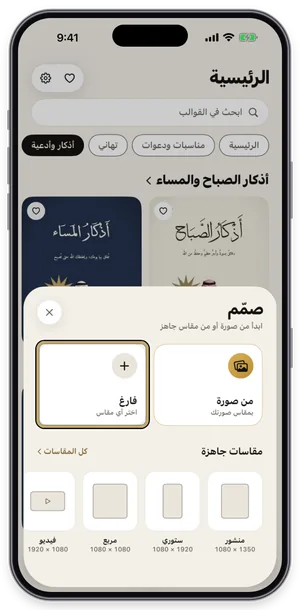
The Create sheet: a blank page or a photo, with ready sizes. Add a photo and adjust it
Add your picture from Photos, or tap the template's photo to replace it. The photo tools appear at the bottom: background removal, blur, magic background, and the magic eraser run on your device and are part of Gold (crowned), while crop, filters, and color adjustments are free. Choose a photo where the person stands out so background removal works well.
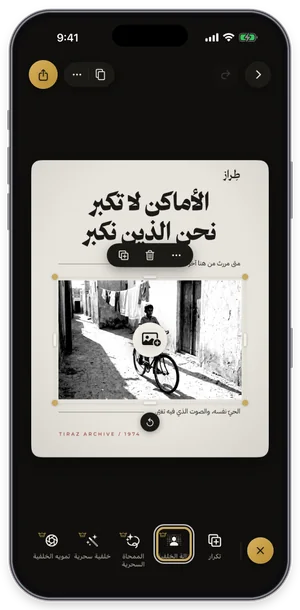
Photo tools: background removal, magic eraser, and more; Gold tools carry a crown. Color a single word
Select the text, tap Word, pick the word to highlight, then open colors and choose one. Only that word changes color, without splitting the line into layers, so the line stays intact. Take the color from the design itself, such as gold on a dark template.
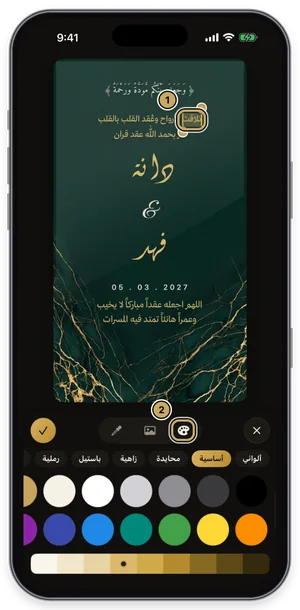
The first word selected, with the color panel open.
A quick comparison
- Text decoration apps: free and quick for an account name, but they aren't fonts and don't work for design.
- Font installer apps: add your fonts to Pages and Keynote, but don't supply the fonts, templates, or proper kashida.
- Canva: good modern Arabic fonts on every platform, few calligraphic ones.
- Tiraz: calligraphic and modern fonts ready in the app with templates and calligrapher-style kashida. You use them in your designs and export images, but they don't install as system fonts. iPhone only for now.
Try a font on your own text in a minute
Choose the font
With the text selected, open Fonts, switch to the Modern tab and try fonts while seeing your own word in each one. Fonts with a crown are part of Tiraz Gold, and a font downloads the first time you use it. Keep to two fonts: a calligraphic one for names and a clear one for details.
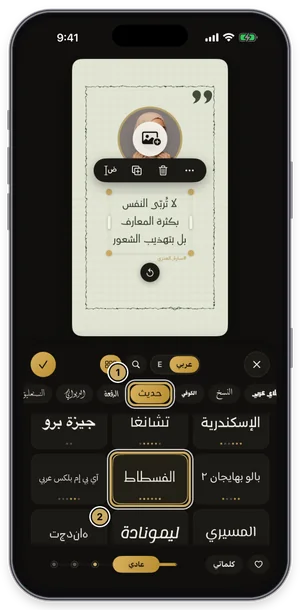
The fonts panel on the Modern tab: the current font is outlined in gold. Stretch the word like a calligrapher
Select the word, open Kashida, turn on automatic kashida, and slide to choose its length. Tiraz places the stretch where it belongs in the word for that font, so letters don't break as they do with a plain tatweel. The short automatic stretch is free; longer stretches and the styles (start, end, spread) are part of Gold, and the Divine Name is never stretched.
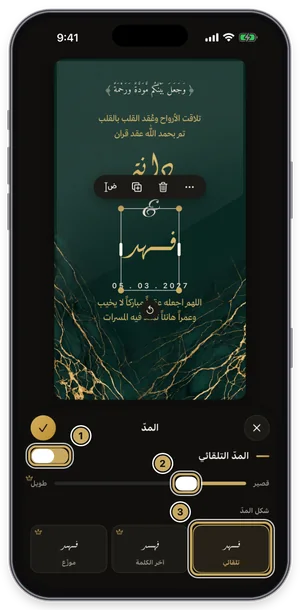
The kashida panel: the length slider, with the kashida styles below. Export or share the design
Tap the gold share button at the top of the editor to open Export: a full-size PNG for free, and a print PDF, 4K, and transparent backgrounds with Gold. Tap Share to send it straight to WhatsApp, or Save to keep it in Photos. For a print shop always choose PDF; a phone image prints soft.
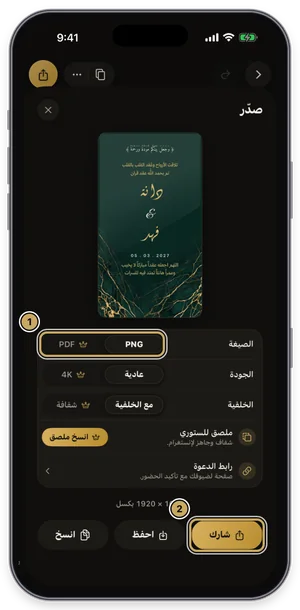
The export sheet: format, quality, and background, then share or save.

Common Questions
How do I change the iPhone's font to another Arabic font?
What is the best Arabic font app for iPhone?
Why don't decorated Arabic “fonts” show in every app?
Are Tiraz fonts free?
Do Tiraz fonts need the internet?
More Articles
- Nikah in Arabic Calligraphy: Fonts, Wording, and Design
- Arabic Condolence Messages, Thank-You Wording, and Ready Cards
- Quran Fonts: Hafs and Warsh for Writing Verses
- Arabic Fonts for Photoshop and Adobe, and How to Type Arabic Correctly
- Types of Arabic Calligraphy, and When to Use Each One
- Free Arabic Fonts for Design and Commercial Use
- Arabic New Baby Wishes and Birth Announcement Cards
- Arabic Wedding Invitation Wording and Formal Templates
- Arabic Graduation Wishes and Graduation Party Invitations
- Ramadan and Eid Greetings in Arabic, and Greeting Cards
- An Invitation Design App with Arabic Calligraphy: How to Choose and Design
- Designing a Digital Invitation with a Link and RSVP
- An App for Writing in Arabic Calligraphy on iPhone
- An Arabic Name Decoration App: Your Name in Ornate Calligraphy
- Designing a Ramadan 2027 Imsakiya
- Designing a Named Greeting Card on Your Phone
- A Canva Alternative for Arabic Design: An Honest Comparison
- All Articles →
Design your next invitation in Tiraz
Gulf-inspired templates, authentic Arabic calligraphy, and print-quality export, right from your phone.